How GitHub Stores and Serves Git Repositories
GitHub is:
Plain Git on local SSDs (Git is disk-latency-sensitive because it performs thousands of sequential object reads per operation)
A small distributed systems protocol: Spokes replication (3 copies per repo, synced via Git protocols).
A routing proxy that picks which Spokes replica to hit.
MySQL for metadata (permissions, branch protection, PR state, etc.)
Knowing this explains why git push --force to a busy repo can lag, why clones from far away are still fast, why GitHub can reboot half its fleet unnoticed, and why massive monorepos still respond in under a second.
The article goes bottom-up:
Git on disk
Spokes (replication)
The routing proxy
Metadata layer (MySQL)
Monorepo optimizations
A GitHub architecture overview from the website:
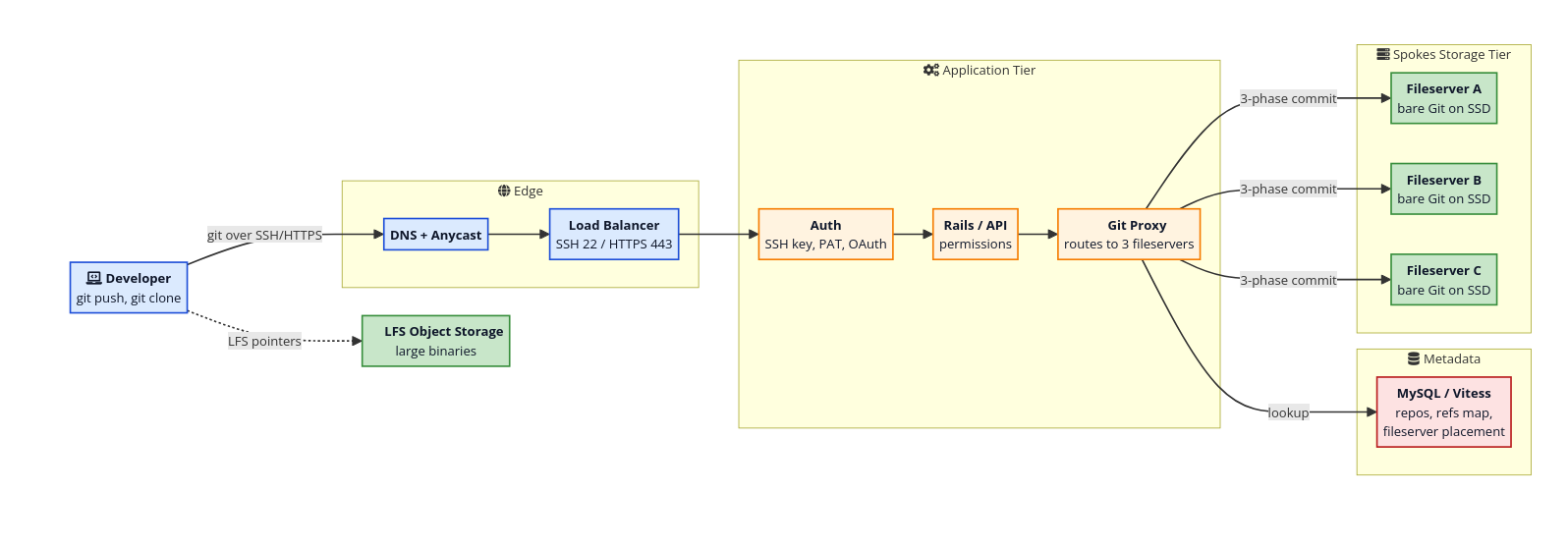
From the picture, I can see several important details:
Large objects use specialized storage: LFS Object Storage. -> Not of our concern now.
4 main components:
Edges: All the routing/load balancing to the appropriate API server.
Application: Auth + Query metadata + Proxy to the appropriate fileservers.
Storage (Spokes): Bare Git-on-SSG Replication happens here.
Metadata: MySQL + Vitess for storing things like permissions, etc.
Git on Disk
This section walks through the basic of how Git structures a repo on disk.
The entire Git database is stored in the .git folder (the below snippet is taken from the site):
.git/
  objects/        the object store (the database)
  refs/           branches, tags, remote pointers
  HEAD            which ref is currently checked out
  config          local config
  packed-refs     packed reference list
The git Object Store
The
gitdatabase is also known as thegitobject store.The
gitobject store is a content-addressable database: A content addressable database identifies an object by its content, usually implemented by a hash of the content.
Image from the website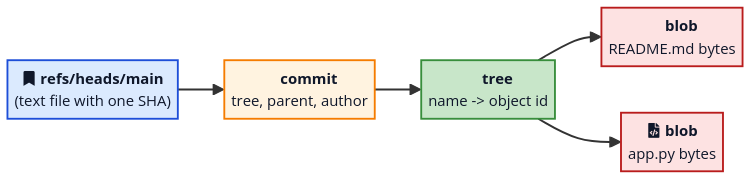
The
gitobject store stores various objects, which fall into 4 types:blobobjects: Representing file contents (not including metadata like name or mode). Physically, the content bytes of a file is stored in this object.treeobjects: Representing a directory listing of:File names.
File modes.
Child object ids (
blobids or sub-tree).
commitobjects: Representing a commit, containing:Commit message.
Commit parents.
Commit author.
Snapshot pointer to the objects.
tagobjects: Representing a signed pointer to another object + a message.
Loose Objects & Pack Files
What happens physically when a new object is created?
Loose Objects
On each new commit, Git stores every new object as a loose object, a single zlib-compressed file under .git/objects/ab/cdef... (the first two hex chars form the directory name).
Why do the first two hex chars form a directory?
Many filesystems (especially older ones like ext3) slow down when a single directory has too many entries, because lookups become linear scans. Splitting into 256 subdirectories (00/ through ff/) keeps files per directory manageable. Nginx does the same thing with its proxy cache.
Pros: Straightforward.
Cons: Doesn't scale well. At millions of objects, you end up with millions of tiny files on disk.
-> Git will periodically pack loose objects into pack files.
Pack Files
So, periodically (or on git gc), Git rolls many loose objects into a single pack-<sha>.pack file, with a companion pack-<sha>.idx index.
Inside a pack, similar objects are stored as deltas against each other.
The index is a sorted list of object IDs and offsets, so
git cat-filecan find any object inO(log n)(disk operations?) without scanning the file. Much like a B-tree index in a database.
References Are Just Files
A branch in Git is just a single text file containing one 40-character commit hash:
$ cat .git/refs/heads/main
9f9258a8ffe4187f08a93bcba47784e07985d999
git push origin main is, at heart, a request to update one such file on the server. Creating a branch is essentially free.
When the number of refs grows into the hundreds of thousands, individual ref files and the packed-refs blob both become a bottleneck. The new reftable format fixes this.
Spokes (DGit): The Storage With Git-on-local-SSD
Image from the site
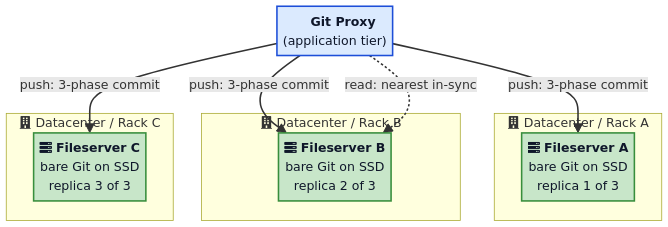
Spokes does three jobs:
Decide repo storage to 3 fileservers.
Sync the 3 replicas on push.
Auto-heal when 1 file server fail.
Some notes:
Spokes is NOT a filesystem or storage engine. It's a coordination layer that sits above plain Git on local SSDs. Each replica is just a normal Git repo.
Why not abstract the storage? Because Git does thousands of sequential small reads per operation. Even 1ms extra latency per read (from network storage) compounds into seconds. So, keep the disk local.
No two replicas share a rack. A rack = an availability zone (one power/network failure can kill a whole rack).
Later, Stretching Spokes placed replicas across continents. So a clone in Singapore hits a fileserver in Singapore, even if the write originated in Virginia.
Why three replicas?
Three is the smallest number that supports majority voting:
1 replica: no redundancy.
2 replicas: no quorum if both fail.
3 replicas: tolerate 1 failure, still have a majority of 2.
Spokes requires at least 2 of 3 to confirm a write before telling the user the push succeeded. This gives:
Durability: the write is on 2 disks before acknowledgment.
Conflict resolution: two concurrent pushes can't both acquire a majority of locks, so one waits.
If 2 servers fail, repos are still readable from the remaining replica, but writes are blocked until repair finishes. This is the CAP tradeoff Spokes makes: consistency + partition tolerance over write availability during degraded state. Same tradeoff as Paxos and other majority quorum protocols.
Read & Write
Writes: 3-Phase Commit
Image from the site
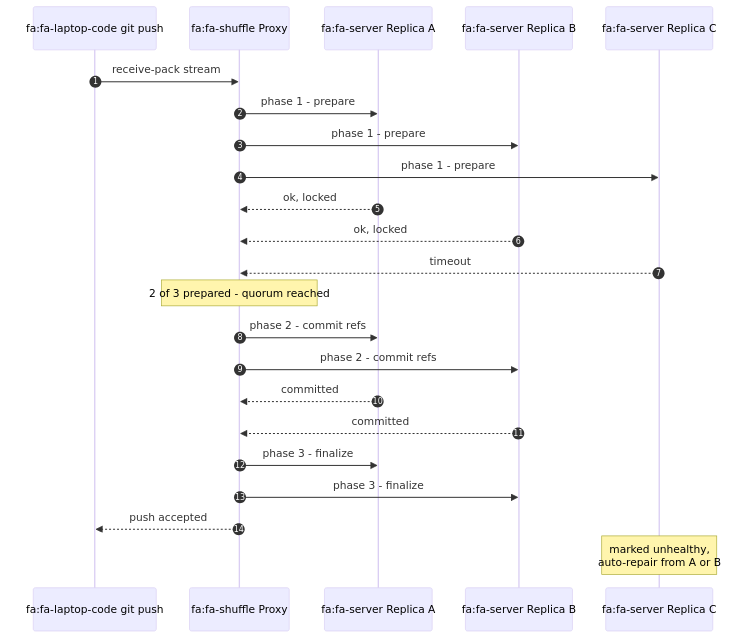
What happens on a git push:
The proxy opens a
git receive-packstream and forwards pack data to all 3 replicas in parallel.Phase 1 - Prepare: each replica acquires local Git ref locks, verifies old ref values match what the client expects.
Phase 2 - Commit: majority confirms it can apply. Each agreeing replica writes new refs atomically via
git update-ref --stdin(a transactional API that GitHub contributed upstream specifically for this).Phase 3 - Finalize: committed replicas release locks. A Spokes checksum is computed across the new ref state. If the majority's checksums match, push is acknowledged.
Any disagreeing replica gets rolled back and marked unhealthy. A repair job copies missing objects/refs from a healthy replica.
How fast is this?
Check the Stretching Spokes post for walkthroughs over the optimizations.
Reads: Geo-routed
Reads are much simpler than writes. No quorum needed, just one up-to-date replica.
The proxy tracks which replicas are in sync per repo.
On each read, it ranks replicas by latency and picks the closest healthy one. If that fails, it falls over to the next.
Under the hood, it's standard Git
upload-packprotocol with the usual optimizations (negotiation, pack reuse, reachability bitmaps).
This is also how geo-replicated reads work: the same voting protocol that ensures write durability also tracks which replicas have caught up, so it can confidently route a git clone to a nearby replica.
Resilience
Failure Detection: Real Traffic, Not Heartbeats
Mechanism:
Primary failure detector: Actual application traffic. After 3 failed RPCs in a row, the proxy deprioritizes that fileserver.
Secondary failure detector: Heartbeats.
Why not just heartbeats?
Heartbeats are slow. A 1 Hz heartbeat notices a failure after hundreds of real requests already failed.
Heartbeats only test a subset. A TCP ping can succeed while the Git binary is corrupt, the disk is hung, or auth is broken.
Detection is also M x N: each app server keeps its own view of which fileservers are healthy.
Many app servers mark one fileserver bad -> fileserver is bad.
One app server marks every fileserver bad -> app server is the broken one.
This diagnostic clarity is impossible with a single global health view.
Self-Healing and Quiescing
When a fileserver dies, repos on it drop to 2 replicas. Spokes starts creating fresh replicas on other fileservers, copying from the surviving two. Healing is N-to-N across the cluster: more fileservers = faster recovery.
For planned reboots, Spokes uses quiescing:
Server is marked offline for new reads, but still accepts writes (dropping one write replica is fine since writes go to all 3).
Existing long reads (e.g.
git cloneof a multi-GB repo over slow network) are allowed to finish before the server reboots.
-> This is why GitHub can roll out kernel patches across storage without users noticing.
The Routing (Proxy) and Metadata Layer
Spokes itself doesn't know where any repo lives - Spokes is the repo data storage.
For metadata about repos, they are stoed in a MySQL-based metadata tier, sharded with a Vitess-style topology.
So the flow is: request comes in -> look up which 3 fileservers hold this repo (MySQL) -> route to them (Spokes).
Why MySQL and not Postgres?
Historical choice. GitHub started with MySQL/Rails and scaled it with Vitess sharding.
Types of Metadata
What the metadata layer stores per repo:
Canonical repo ID and owner.
The 3 fileserver IDs holding replicas, with a generation number per replica.
What is a generation number?
A monotonically increasing counter that increments on every successful write. It tells Spokes how up-to-date a replica is without comparing the full ref state. E.g. after a push, the 2 confirming replicas get generation 42, the one that missed it stays at 41. Same idea as a log sequence number (LSN) in databases.
Replica status:
in-sync: has latest refs and objects, safe for reads and writes.
lagging: behind on recent writes, needs to catch up before serving reads.
unhealthy: failed (disk error, crash, disagreed during write). Needs repair.
decommissioning: server being retired, repos draining out to other servers.
Slug mapping (
octocat/hello-world-> repo ID).
Routing During git push
Image from the site
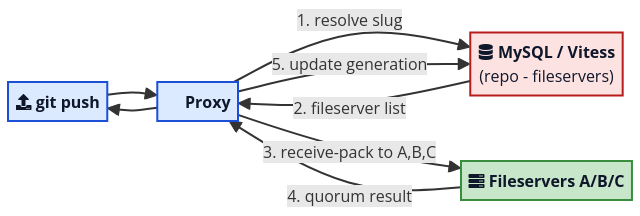
Resolve slug (
octocat/hello-world) to repo ID via MySQL.Auth check via Rails app + permissions service.
Look up the 3 fileservers holding replicas of that repo ID.
Open
receive-packconnections to all 3, run the 3-phase commit.On success, update metadata with new generation number and any replica health changes.
Important: the fileservers know nothing about PRs, branch protection, webhooks, etc. All of that lives in the Rails app. A push triggers a webhook because the proxy publishes an event onto an internal log (Kafka-like) after the quorum vote succeeds, not because the fileserver knows what a webhook is.
-> Clean separation: fileservers = dumb storage, Rails = all the business logic.
Final Picture
Image from the site
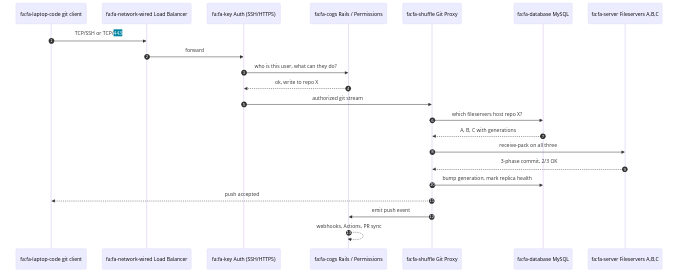
Optimizations
Pack Files, Multi-Pack-Index and Reachability Bitmaps
If Spokes solves the distribution problem, these solve the single-server performance problem. Big repos (Linux, Chromium, Windows source tree) have tens of millions of objects and hundreds of thousands of refs.
Pack files (recap): delta compression. Two versions of the same file are stored as a small diff, shrinking repos by 5-10x. Each pack has an .idx that maps object ID to byte offset.
Multi-Pack-Index (MIDX): once a repo has dozens of pack files, looking up an object means checking each .idx in turn (linear scan). MIDX is a single index spanning many packs, turning that into one binary search. Can cut common operations by an order of magnitude on large repos.
Reachability bitmaps: many Git operations need to answer "given this commit, what objects are reachable?". Naive: walk the commit graph. Fast: a precomputed bitmap, one compressed bit per object. Set operations on bitmaps are essentially free, so computing the diff between two refs is a single XOR. GitHub extended bitmaps to work with MIDX, so huge repos can keep bitmaps fresh without expensive full repacks.
Partial Clone and Sparse Checkout
Client-side monorepo optimizations:
Partial clone (
git clone --filter=blob:none): skip downloading blobs, lazily fetch on demand.Sparse checkout: check out only a subset of paths into your worktree.
Together they make a 10 GB monorepo feel like a small project for any given developer.
Reftable
The classic ref store breaks at hundreds of thousands of refs:
Loose refs: millions of tiny files.
packed-refs: giant text file rewritten on every change.
Reftable: binary, prefix-compressed, multi-block file with constant-time lookup and atomic appends. For Android's 866k refs: storage shrinks to ~60% of packed-refs, lookups go from 410ms to 34 microseconds.
Git LFS
Git is great at source code but not really at 5 GB video files. Every clone downloads every version of every file, and delta compression doesn't help for already-compressed binaries.
Git LFS solves this by not putting big files in Git at all. When you git lfs track "*.psd", a clean filter intercepts large files at git add time and replaces them with a tiny pointer:
version https://git-lfs.github.com/spec/v1
oid sha256:4d7a214614ab2935c943f9e0ff69d22eadbb8f32b1258daaa5e2ca24d17e2393
size 12345
The pointer is what gets stored in Git and replicated by Spokes.
The actual bytes are uploaded over HTTPS to a separate LFS object storage (S3-style).
On checkout, a smudge filter sees the pointer, fetches real bytes by SHA-256, writes them to worktree.
Image from the site
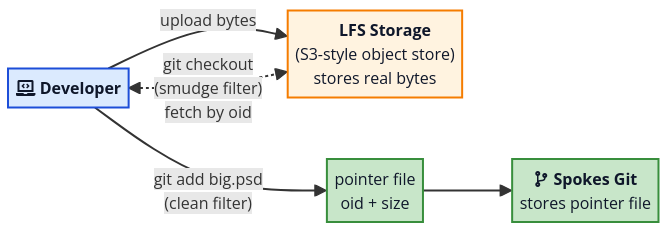
The split is clean: Spokes only ever sees small text pointers, so 3-replica voting stays cheap. Big bytes live in object storage built for that workload.
Why does this matter for our system?
Same pattern applies if we ever need to store large files: keep lightweight metadata/pointers in the main DB, store actual bytes separately. But for plain text DBML files at 20k LOC, this isn't relevant yet.